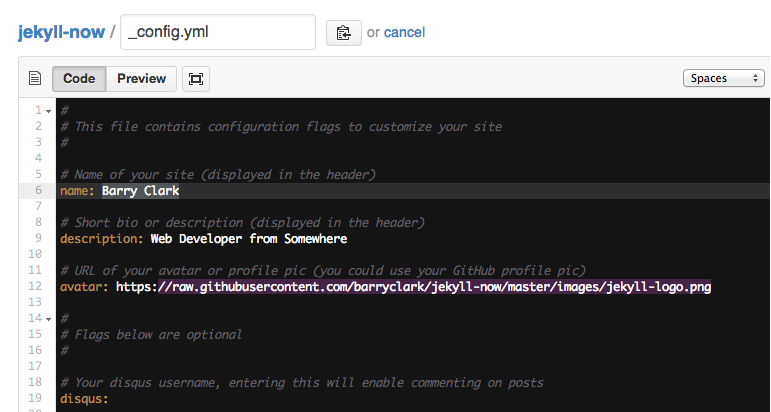
<?xml version="1.0" encoding="utf-8"?><feed xmlns="http://www.w3.org/2005/Atom" ><generator uri="https://jekyllrb.com/" version="3.10.0">Jekyll</generator><link href="https://stephenbeale.github.io/feed.xml" rel="self" type="application/atom+xml" /><link href="https://stephenbeale.github.io/" rel="alternate" type="text/html" /><updated>2025-01-08T09:44:06+00:00</updated><id>https://stephenbeale.github.io/feed.xml</id><title type="html">Steve Beale</title><subtitle>Web Developer from Somewhere</subtitle><entry><title type="html">You’re up and running!</title><link href="https://stephenbeale.github.io/Hello-World/" rel="alternate" type="text/html" title="You’re up and running!" /><published>2014-03-03T00:00:00+00:00</published><updated>2014-03-03T00:00:00+00:00</updated><id>https://stephenbeale.github.io/Hello-World</id><content type="html" xml:base="https://stephenbeale.github.io/Hello-World/"><![CDATA[<p>Next you can update your site name, avatar and other options using the _config.yml file in the root of your repository (shown below).</p>

<p><img src="/images/config.png" alt="_config.yml" /></p>

<p>The easiest way to make your first post is to edit this one. Go into /_posts/ and update the Hello World markdown file. For more instructions head over to the <a href="https://github.com/barryclark/jekyll-now">Jekyll Now repository</a> on GitHub.</p>]]></content><author><name></name></author><summary type="html"><![CDATA[Next you can update your site name, avatar and other options using the _config.yml file in the root of your repository (shown below).]]></summary></entry></feed>